SWPrize
Prize List for use with Sailwave
SWPrize is included with the standard installation of Sailwave.
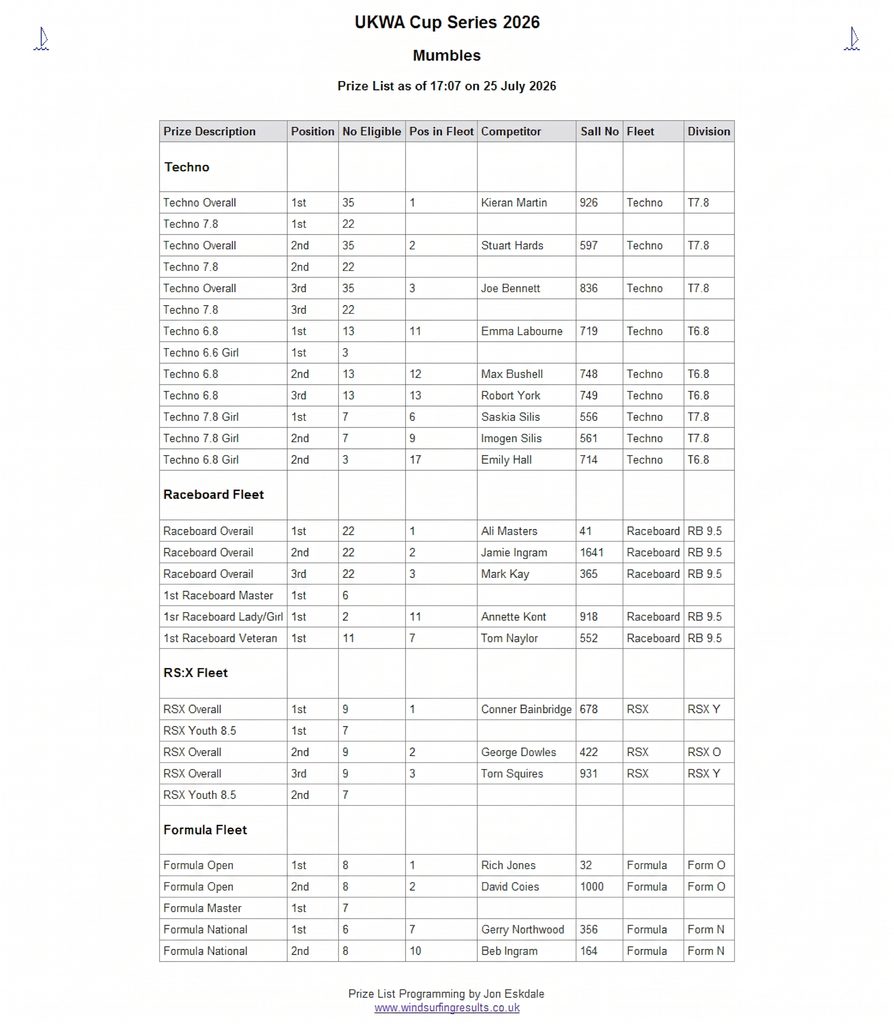
So what does it produce? Below is a sample of the output:
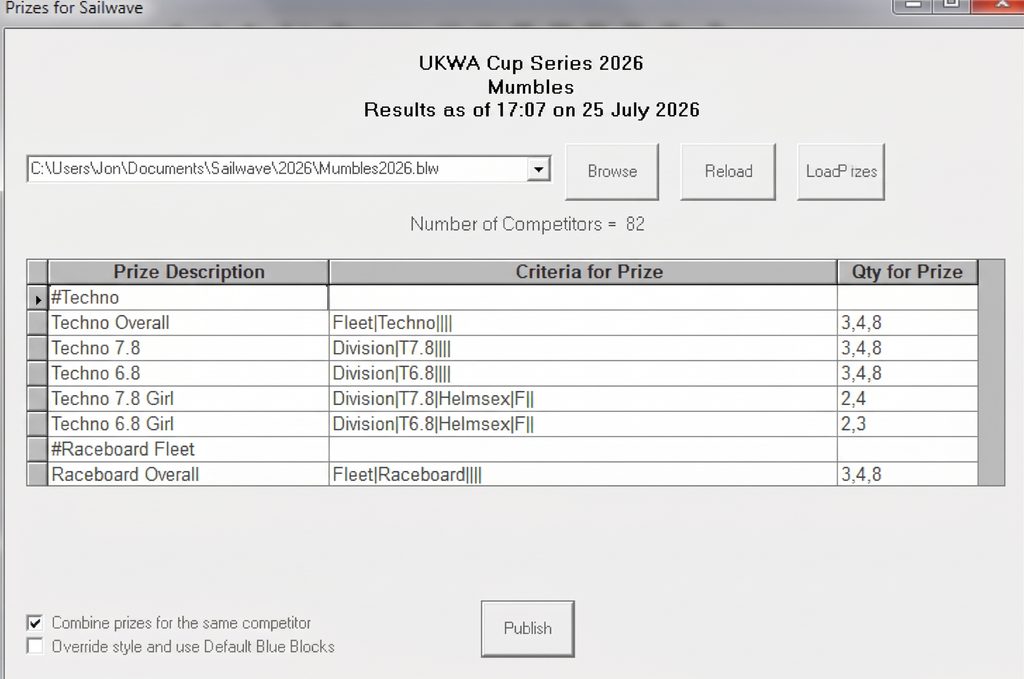
And this is the format of program that specifies the output
Some of the Key Features are
- Designed to be extremely easy to use and very fast
- When you run the program, it automatically reads the last file opened with Sailwave
- Displays the Event, Venue, and Title
- Counts and displays the Number of competitors
- Learns the columns used within Sailwave and the properties of these.
- Uses the same Styles as used by Sailwave.
Normally, it will automatically load the last file used by Sailwave however, if you wish to use a different file:-
- The Dropdown box is populated with the last 20 files used by Sailwave
- The Browse allows you to open any Sailwave .blw file
- Reload allows the file to be reloaded if it changes (You are warned with the option to reload if the file has changed since you loaded it when you click Publish)
- If you have entered prizes for this event, then they are loaded with the. blw Sailwave file
- If you have defined a prize list for a different event, then to save re-entering it, you can use the Load Prizes to use the same for this event.
The Prizes are defined in a 50-row by 3-column grid
- If the Prize Description starts with a #, e.g., #Techno then this signifies a Heading
- The Criteria for Prize allows you to define the Criteria that the Prize is given for.
- Qty for Prize allows you to specify when Prizes are given – Looking at the example above 3,4,8
- The first 3 signifies that a 1st prize is awarded if there are 3 or more eligible Competitors (No prize is awarded if less than 3 eligible competitors)
- The Second 4 signifies that a 2nd prize is awarded if there are 4 or more eligible Competitors
- The third 8 signifies that a 3rd prize is awarded if there are 8 or more eligible Competitors.
- You are not limited to just 3 prizes
- If there is only one prize, then only enter one number; a 1 would give a prize if there is a single eligible competitor.
- If the number of eligible competitors does not meet the minimum, then the Prize is not printed.
- If there are no eligible prizes within the Heading Group, the Heading is not printed.
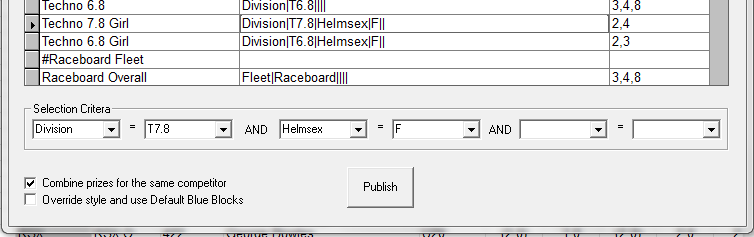
When you click in the Criteria column, the Selection Criteria boxes appear as shown above.
- You can select 3 conditions for the prize. Looking at the example above for the Techno 7,8 Girl prize:-
- The First Box is automatically populated with the Columns used in Sailwave
- Once you select a value, the Second box is populated with the Valid values you can select
- Here we have selected 2 prizes for Techno 7.8 Girls where the Division = T7.8 and Helmsex = F
- If you rename columns in Sailwave, the renamed values will appear in the Dropdown boxes, but the true name will appear in the grid. This allows the same prize definition to be used when columns are renamed for different events
- In the rare occasion when more than 3 criteria are needed then it is recommended that you use a column in Sailwave to hold the conditions. This column can be populated within Sailwave using the Toolset Competitor fields. This is also safer, as it allows you to check which competitors are affected
- To enable easier editing of the grid, right-click on the boxes at the left of the grid, and you can Copy, Paste, Insert, or Delete Rows of the grid
When you have defined the prizes, click Publish and this will
- Save the prize definitions to a file in the same directory as the blw file with the same name but a .prz extension
- The Prizes are calculated and displayed in the Default Browser, similar to publishing results in Sailwave.
- The Same Style as was used by Sailwave for the results is used unless the checkbox to use the Blue blocks is checked
- A file Prizes.htm is stored in the same directory as the blw file.
- If the Combine prizes for the same competitor is checked, Then when a prize is displayed, any other prizes that this competitor has won are displayed immediately following.
- The column displays are semi-intelligent in that they depend upon which ones are used in Sailwave. e.g., above, the Nationality is not used, but if it had been used in Sailwave, then the Column would have been displayed
- You can use the Helm or Crew fields, or both.